
What is PF and Why is it Important?
The Employees’ Provident Fund (EPF) is a long-term savings scheme which is run by the Indian Government and managed by EPFO (Employees’ Provident Fund Organisation). Both the employee and employer contribute to the fund every month in PF account on monthly basis. It is employer duty to deduct PF from employee and deposit the same to EPFO on the given cut off date which is 15th of Every month.
The purpose of PF is to provide financial security at retirement. In special circumstances, PF can also be withdrawn during employment or after leaving a job. This helps employees stay financially strong and independent.
When Can PF Be Withdrawn?
PF can be withdrawn only under valid reasons allowed by the PF department. These include:
- After leaving a job (after at least 2 months of unemployment)
- At retirement
- During medical emergencies
- For marriage (self, children, siblings)
- To buy or construct a house
- For children’s education
- During COVID-19 or other special emergencies
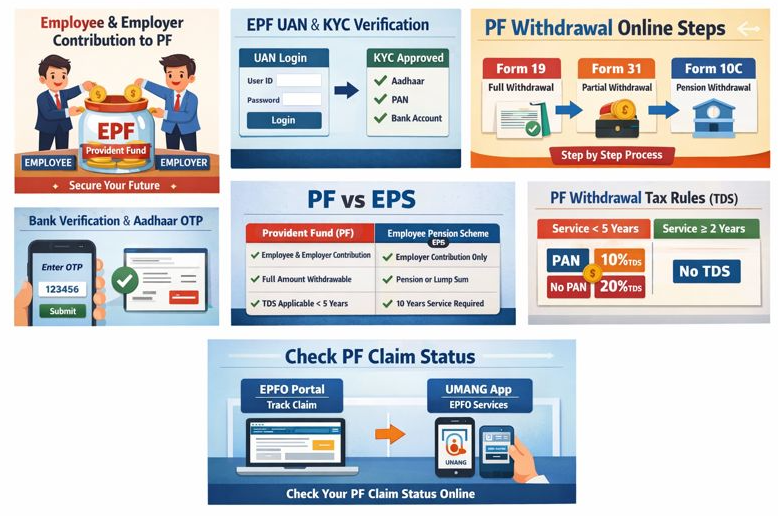
Essential Conditions for PF Withdrawal
Before applying for PF withdrawal, ensure the following:
- UAN (Universal Account Number) is active
- Aadhaar is linked with UAN
- Bank account is linked and verified on EPFO portal
- PAN is updated (if PF is more than ₹50,000)
- Mobile number is linked with Aadhaar
These are essential thing you should have with you while processing your withdrawal request.
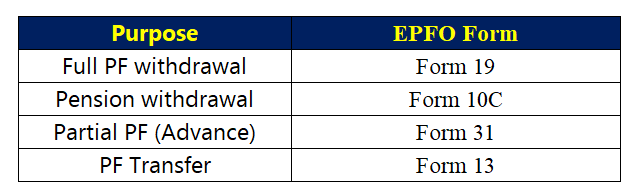
Types of PF Withdrawal and Forms
PF Withdrawal Online Process – Step by Step
Follow these steps carefully to withdraw PF without any problem:
Step 1: Login to EPFO Member Portal
- Website: unifiedportal-mem.epfindia.gov.in
- Enter the UAN and password if you are first time then create your credential
- If you forgot the password, click Forgot Password to recover it
Step 2: Check KYC Status
- Go to Manage → KYC
- Aadhaar, PAN, and bank details must be Approved
- If not approved, ask your HR to approve via DSC
Step 3: Select Claim Option in Online Services
- Go to Online Services → Claim (Form 31, 19 & 10C)
- Your personal information will be displayed for verification you can check there
Step 4: Bank Account Verification
- Enter the last 4 digits of your bank account
- Click Verify and accept the Undertaking
Step 5: Choose Claim Type
You will see the following options:
- PF Advance (Form 31) – Partial PF
- PF Withdrawal (Form 19) – Full PF
- Pension Withdrawal (Form 10C)
Select according to your need.
Step 6: Enter Reason and Amount (for Partial PF)
As we are having the option of partial withdrawal can follow the steps
- If you select Form 31, choose the reason (Medical, Marriage, House, etc.)
- Enter the amount needed
- Upload supporting documents if required
Step 7: Aadhaar OTP Verification
- An OTP will be sent to your Aadhaar-linked mobile number
- Enter OTP and click Submit
- Your PF withdrawal claim is successfully submitted
How to Check PF Claim Status
You can check your PF claim status in two ways:
Method 1: EPFO Portal
- Online Services → Track Claim Status
Method 2: UMANG App
- UMANG App → EPFO Services → Track Claim
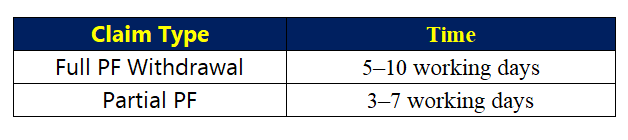
How Long Does PF Take to Credit?
This is very common question which people ask but I will like to tell you not sure but tentative timeline as this pertain to government processs.
Tax Rules for PF Withdrawal
- PF is taxable if service is less than 5 years
- TDS applies if withdrawal > ₹50,000
- PAN available → 10% TDS
- PAN not available → 20% TDS
- If your total income is below the tax slab, submit Form 15G / 15H
Common PF Withdrawal Problems and Solutions
Problem 1: Aadhaar not verified
Update Aadhaar and wait for approval
Problem 2: Bank account mismatch
Update correct bank details
Problem 3: Claim rejected
Check rejection reason, correct it, and reapply
PF Withdrawal vs PF Transfer – Which is Better?
I am given you here a comparison so that you can decide as per your convenient

Expert Advice: When changing jobs, transfer PF instead of withdrawing.
How to Register PF Grievance
If PF is delayed:
- Go to EPFiGMS portal
- Click Register Grievance
- Enter UAN
- Describe the problem
- Upload supporting documents
Usually resolved within 15–30 days
FAQs
Q1: How long does online PF withdrawal take?
A1: Usually 5–10 working days
Q2: Is employer approval required?
A2: No, if KYC is approved
Q3: Can PF be withdrawn after changing job?
A3: Yes, but transferring PF is better
PF and EPS Withdrawal – Common Confusions
PF vs EPS Difference
- PF (Provident Fund)
- Employee + Employer contribution
- Withdrawable at retirement or job leaving
- TDS applies if service < 5 years
- EPS (Employee Pension Scheme)
- Only employer contribution part goes to EPS
- Pension or lump sum
- Minimum 10 years of service required for pension
Confusion: PF withdrawal does not include EPS
Job Change: Withdraw or Transfer PF?
- Many employees withdraw directly
- Problem: Retirement fund reduces
- Solution: Transfer PF after joining a new job
Tip: Always transfer PF after job change; withdraw only in emergencies
Partial vs Full PF Withdrawal
- Partial PF (Form 31): Marriage, medical, house, education, max 90% or allowed limit, taxable if service < 5 years
- Full PF (Form 19): After resignation or retirement, includes PF + EPS (if eligible)
TDS Confusion
- Service < 5 years → TDS applies
- PAN available → 10%
- PAN not available → 20%
- Service ≥ 5 years → TDS exempt
EPS Withdrawal Timing
- EPS pension available for service ≥10 years
- Service <10 years → lump sum EPS withdrawal only
Online Claim Rejection Reasons
- Incomplete KYC
- Aadhaar, PAN, bank mismatch
- Missing employer approval
Multiple PF Accounts and UAN
- Multiple accounts linked to same UAN → auto merge
- One claim is sufficient
Key Takeaways
- PF and EPS withdrawal are separate
- Partial and full withdrawal rules differ
- TDS depends on service period and PAN
- Always transfer PF during job change; withdrawal as last resort
- KYC, Aadhaar, Bank, and PAN must be 100% correct for online claim
How was PF Withdrawal process in 2014?
Around 2014, these forms were used to withdraw PF:
- Form 19 – For PF amount
- Form 10C – For Pension (EPS)
- Form 31 – For Advance / Partial withdrawal
All these forms required employer’s sign & seal,
because EPFO did not accept claims directly from employees at that time.
What if employer was not giving signature?
If the employer intentionally did not give the sign, the employee had these legal options:
Option 1: Direct Complaint to EPFO Office
The employee could submit a written complaint to the regional PF office, along with:
- Appointment letter
- Salary slips
- PF number
- Relieving / resignation proof
After that, the PF officer would send notice to the employer.
Option 2: Direct Claim with Affidavit
In some special cases, EPFO could process the claim without employer’s sign, if the employee submitted:
- Affidavit
- ID proof
- Bank proof
(But this depended on the discretion of the PF officer.)
Option 3: Complaint to Labour Commissioner
The employee could file a complaint with the Labour Department / Labour Commissioner:
- Employer denying sign was considered illegal
Usually, the employer would give the sign after receiving notice
Option 4: Legal Notice
The last option:
- Send a legal notice to the employer
Because PF is the employee’s statutory right, the employer cannot refuse it.
Changes after 2014
| Year | Change |
| 2015 | UAN became mandatory |
| 2016 | Online PF claim introduced |
| 2017 | Aadhaar-based claim, employer signature not required |
| Today | Employer involvement is almost zero |
About the Author
